Skip to content

GoHighLevel and SaaS Support Specialist

GoHighLevel systems, built for the way you work.

I help agencies onboard and support clients across their GoHighLevel sub-accounts, configure CRM systems and workflows, and troubleshoot the issues that affect day-to-day operations.

Meet Daniel: GoHighLevel and SaaS Support
Meet Daniel: GoHighLevel and SaaS SupportWatch on Loom

Agency sub-account onboarding, white-label SaaS support and client training.

Services

Practical help across your GoHighLevel setup and daily operations.

Agency onboarding and sub-account setup

Get new agency sub-accounts ready for daily use with structured onboarding, account duplication and customization, contact imports, calendars, inquiry forms and a clear handover.

  • Client intake and sub-account provisioning
  • Account duplication and custom values setup
  • Contact imports and lead/booking pipelines
  • Calendars, inquiry forms and booking links
  • Onboarding calls and handover guidance

CRM builds and automation

Shape the CRM around how your team actually works, with pipelines, forms and follow-up that connect end to end across your sales and booking journeys.

  • Pipelines, forms and booking journeys
  • Email and SMS follow-up sequences
  • Estimates, contracts, invoices and reminders
  • Opportunity stages and automation rules

SaaS technical support

Help agency sub-account users work through calendar, booking-link, form and workflow issues, with clear explanations, ongoing client communication and escalation where needed.

  • Calendar and booking-link troubleshooting
  • Form and workflow issue review
  • Plain-language explanations and next steps
  • Ongoing client communication and escalation

Funnels and client training

Support lead-capture journeys and give teams the confidence to run their system day to day with practical walkthroughs and documentation.

  • Lead-capture and survey qualification journeys
  • Launch handovers and next-step guidance
  • Practical Loom walkthroughs
  • Client training on day-to-day operation

Selected work

GoHighLevel systems, automation and client handovers

Two recorded walkthrough case studies, connected automation systems and supporting written case studies across onboarding, CRM configuration, data work and funnels.

Featured video case study

Agency Client Onboarding and SaaS Support

A walkthrough of onboarding and ongoing support within a white-label GoHighLevel agency, from client intake and account preparation to handover and user support.

Purpose

Gather the information needed for a client account, adapt the setup to the business and help the client start using the CRM.

Work shown in the walkthrough

  • Onboarding-call booking, intake forms and asset collection
  • Calendar requirements and import preparation
  • Snapshot customization and additional automations
  • A setup checklist, booking-page example and estimate, invoice and contract templates
  • Recorded guidance and follow-up for clients who miss onboarding

Contribution

Client onboarding, sub-account customization, documentation, walkthroughs and technical support, including revising snapshots and adapting account setups.

Key moments in the walkthrough

0:45Onboarding flow3:17Account customization and checklist6:16Client follow-up and training
Featured video case study

Funding Company Funnel and Client Handover

A client handover walkthrough explaining a connected funnel for lead capture, qualification, appointment booking, webinar follow-up and offer pages.

Purpose

Show the client how the pages connect, how a lead moves through the journey and what is needed for launch.

Work shown in the walkthrough

  • Lead-magnet opt-in, qualification survey, appointment and thank-you pages
  • Follow-up emails directing contacts to webinar registration
  • Webinar reminders, offer, upsell and downsell pages, confirmation and replay pages
  • The handover document, support channel and launch-call next steps

Contribution

Funnel configuration and client handover, explaining page connections, customer journeys, follow-up and launch dependencies.

The handover identifies calendar availability, payment-provider connection and client assets as launch requirements still to finalize.

Key moments in the walkthrough

1:30Lead capture2:18Qualification and booking4:23Follow-up and webinar journey12:22Replay and offers

Automation Case Studies

Lead Management and Booking Automation

An automation architecture handling the full customer lifecycle from lead capture through appointment booking, estimate review, contract execution and internal operational handoffs.

6 connected workflow automationsAll 6 workflow canvas captures available to viewConfiguration-focused implementation

System architecture note: Customer and team actions connect these six workflows. They operate as distinct, coordinated automations triggered by specific system milestones rather than a single uninterrupted sequence. All enrollment counts and private account identifiers in the canvas captures are privacy-edited.

Workflow Overview•Full canvas capture
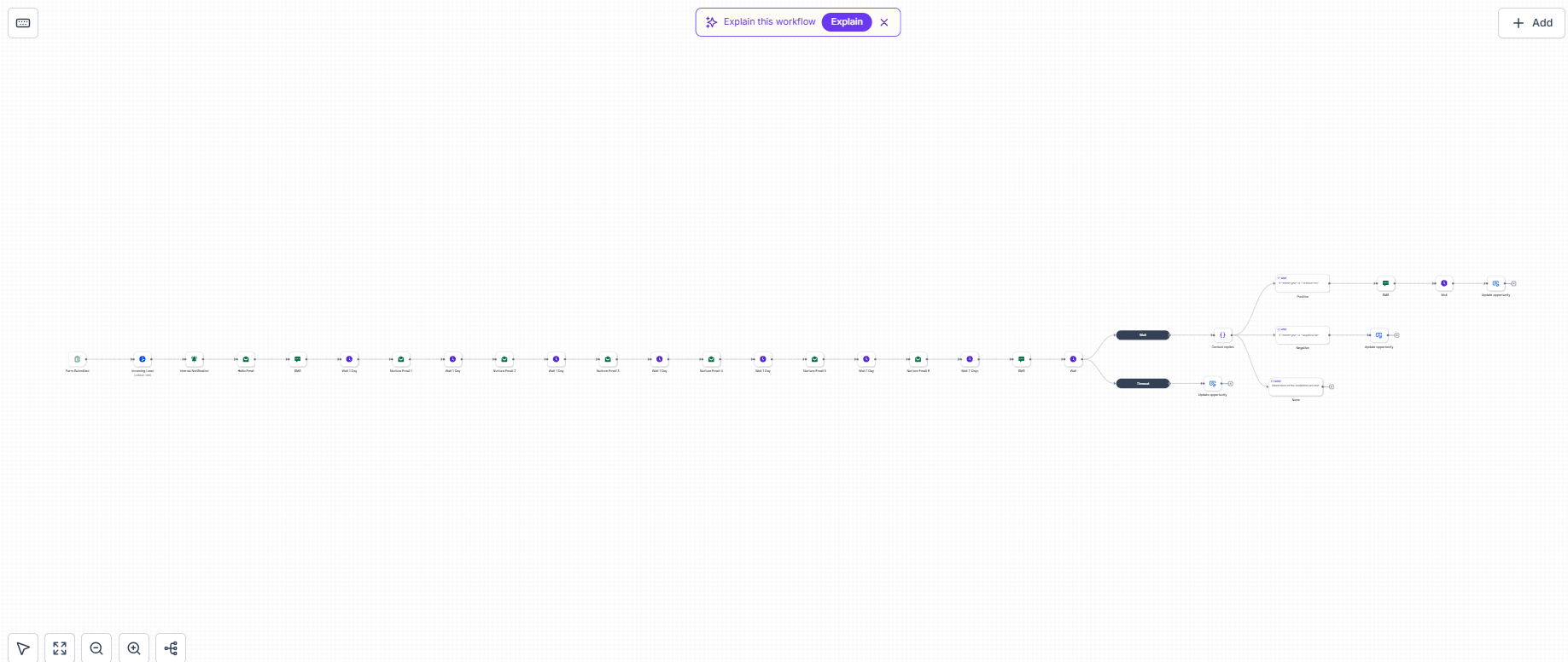
Workflow canvas showing form submission trigger, lead opportunity, internal notification, email and SMS nurture series, wait steps, and reply/timeout interest check branches
Workflow Overview

Inquiry capture, scheduled nurture and reply-based follow-up shown in the workflow overview.

Lead capture and multichannel nurture

Configured trigger

Submission of a specified inquiry form.

Creates an open opportunity, maps inquiry fields, alerts staff and starts an email/SMS nurture sequence. A later interest check waits for a reply for up to two days and routes recognized replies or a timeout into the configured follow-up actions. The positive route adds an SMS and a two-day wait. Positive, negative and timeout routes use the same configured destination stage.

  • Inquiry form submission trigger with custom field mapping
  • Create open opportunity in the lead pipeline
  • Internal staff alerts and notification dispatch
  • Multichannel email and SMS nurture series
  • Interest check waiting for a reply for up to two days
  • Positive route adds follow-up SMS and a two-day wait
  • Positive, negative and timeout paths route to the configured destination stage
Branches & handoffs: Positive, negative and timeout routes all progress into the configured destination stage without separate outcome branches.
Form triggersCustom fieldsOpportunitiesInternal alertsEmail/SMS nurtureReply and timeout logic
Workflow Overview•Full canvas capture
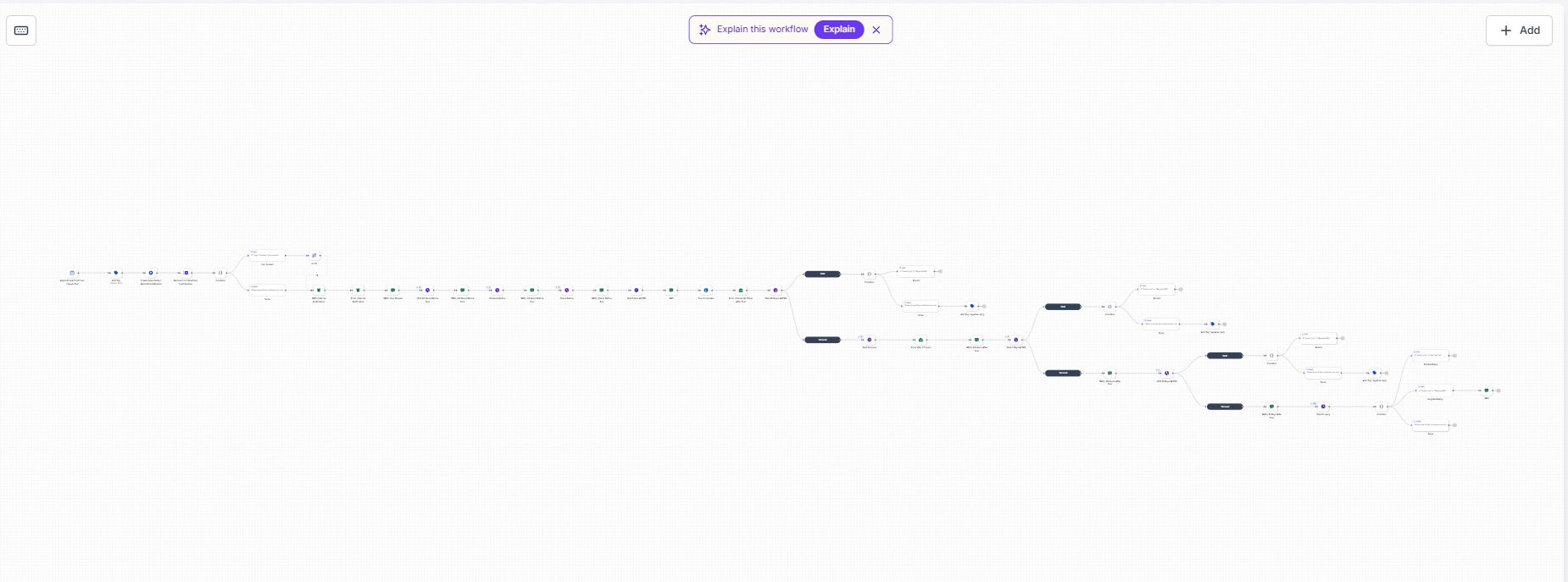
Workflow canvas showing confirmed appointment trigger, booking tag, appointment-booked opportunity, reminders 48h, 24h and 1h prior, and timed follow-up
Workflow Overview

Appointment confirmation, reminders and later reply/timeout paths in the workflow canvas.

Appointment reminders and follow-up

Configured trigger

A confirmed appointment on a specified calendar.

Adds the booking tag, creates an appointment-booked opportunity and removes generic lead nurture. Sends internal notifications, customer confirmation and reminders 48 hours, 24 hours and one hour before the appointment, followed by timed email/SMS follow-up with reply and timeout branches.

  • Confirmed appointment trigger on specified calendar
  • Add booking tag and create appointment-booked opportunity
  • Remove contact from generic lead nurture workflow
  • Send internal notifications and initial customer confirmation
  • Relative reminder cadences: 48 hours, 24 hours and 1 hour before appointment
  • Timed post-appointment email and SMS follow-up with reply and timeout branches
Branches & handoffs: Removes contact from generic nurture to prevent overlapping messages, coordinating reminders before the appointment and branching follow-up afterward.
Calendar triggersRelative waitsWorkflow coordinationNotificationsConditional follow-up

Follow-up, contracting and booking handoffs

These automations handle estimate review, client acceptance, agreement dispatch, date selection and deposit handoffs.

Workflow Overview

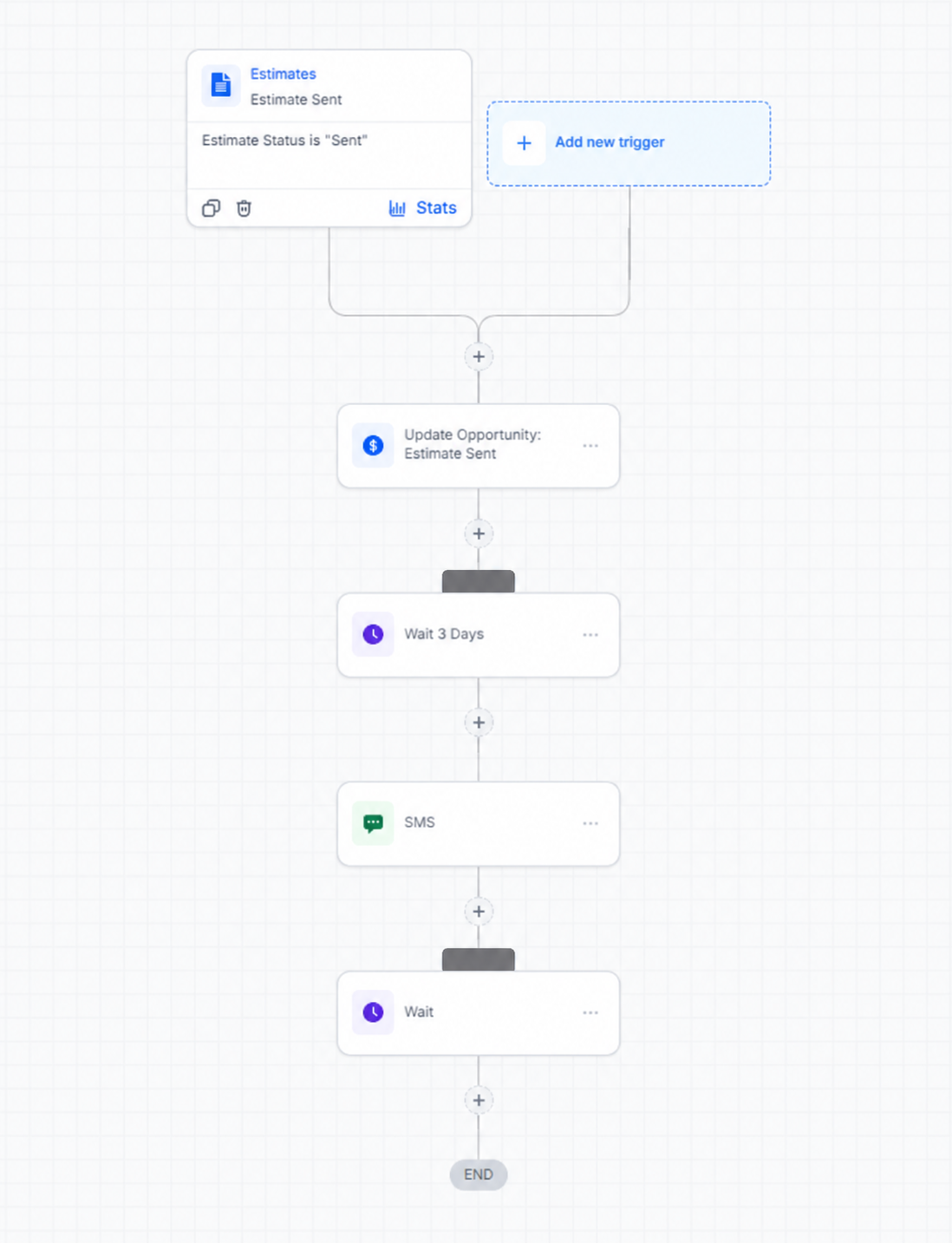
Estimate follow-up

Workflow configuration for estimate status changed to Sent, opportunity update, three-day delay and SMS follow-up with reply wait
Workflow Overview

A sent estimate starts a three-day follow-up sequence. Live enrollment counts have been redacted.

Trigger: An estimate status changes to Sent.

Runs the opportunity action, waits three days, sends the configured SMS and waits for a reply. No later actions are shown.

Estimate-status triggersOpportunitiesDelayed follow-upSMS templatesReply waits
Workflow Overview

Accepted estimate to contract handoff

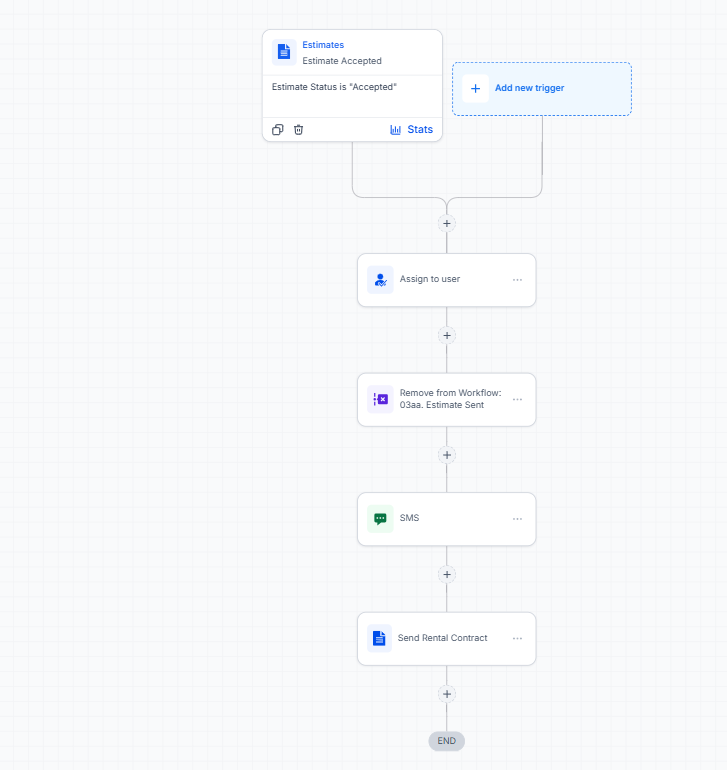
Workflow canvas showing estimate status Accepted trigger, assign to user, remove from estimate sent workflow, SMS, and send rental contract
Workflow Overview

Accepted-estimate event, user assignment, prior-follow-up removal and contract sending.

Trigger: An estimate status changes to Accepted.

Assigns the contact to a user, removes the Estimate Sent follow-up workflow, sends an SMS and then sends the configured contract through email and SMS.

Contact ownershipWorkflow removalDocument sendingCommunication handoffs
Workflow Overview

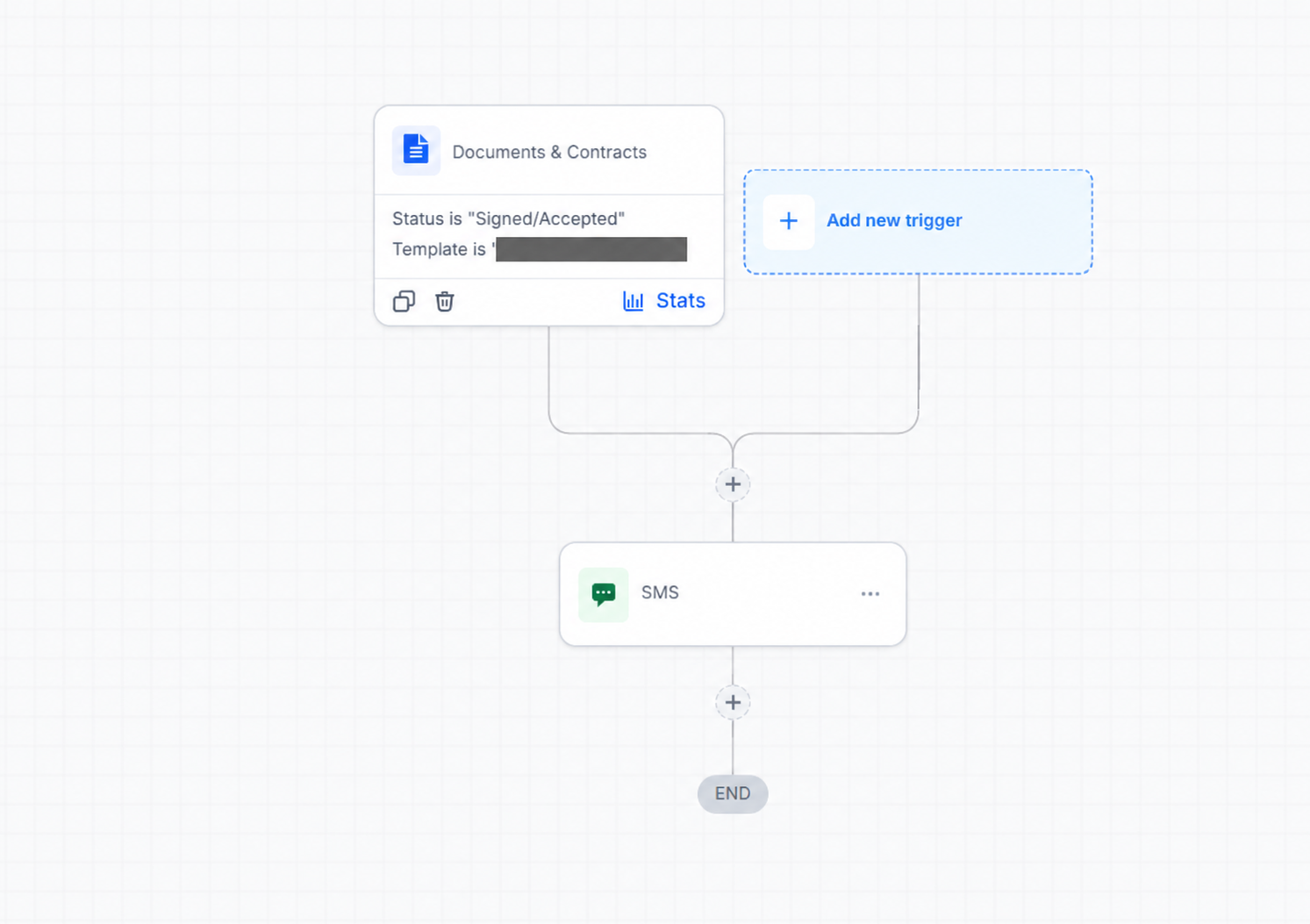
Document status to booking link

Workflow action listening for document status Signed/Accepted and sending SMS with custom value booking link
Workflow Overview

A matching document status starts the booking-link SMS. The client-specific template name is redacted.

Trigger: A document event matching the configured status and template filters.

Sends an SMS containing a date-selection link from account custom values. The screenshot shows Signed/Accepted filtering and a single SMS action.

Document-status triggersTemplate filtersCustom valuesBooking handoffs
Workflow Overview

Confirmed booking and deposit-form handoff

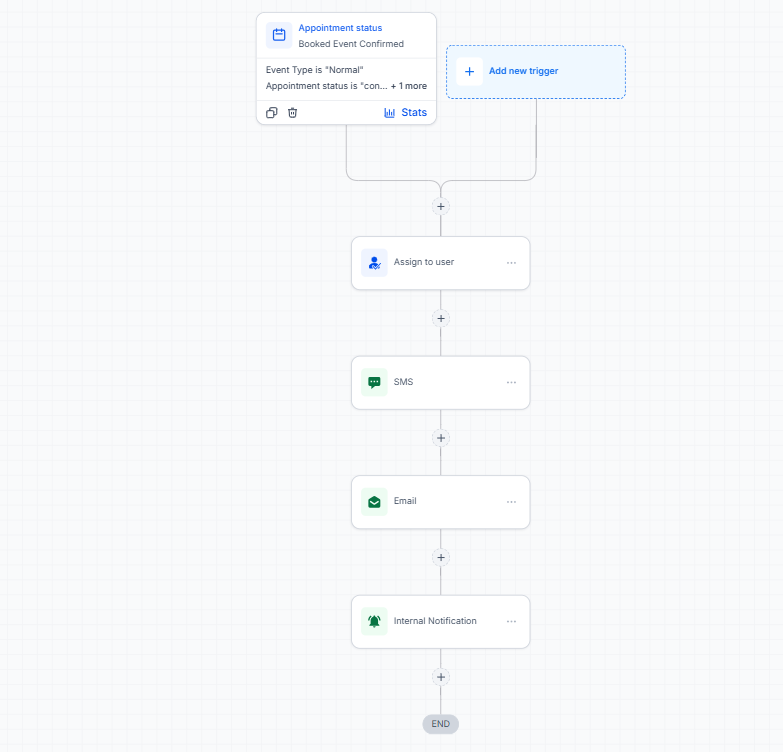
Workflow canvas for confirmed booking calendar trigger, user assignment, SMS, deposit form instructions and staff booking-type selection alert
Workflow Overview

Booking confirmation triggers customer communications and an internal operational handoff.

Trigger: A confirmed appointment on the specified booking calendar.

Assigns the contact to a user, sends an SMS, emails deposit-form instructions using account custom values and alerts staff to open the contact record and select the booking type.

Calendar triggersContact ownershipCustom valuesCustomer communicationsInternal staff handoffs

Supporting written case studies

Onboarding, workflow, migration and funnel walkthroughs

Written case studies across agency onboarding and sub-account configuration, estimate-to-booking operations, contact and booking migration, and lead qualification funnels.

Case study

Agency client onboarding and sub-account configuration

Agency sub-account onboarding, configuration and SaaS support

Helped agency clients get their sub-accounts ready for daily use through structured onboarding, account duplication, contacts, calendars and clear client guidance.

OnboardingSub-accountsCalendarsClient training
Case study

Estimate-to-booking workflow support

Workflow support and client training

Connected pipeline stages, estimates, contract signing, pricing and reminder steps through a practical client walkthrough.

PipelinesEstimatesContractsWorkflow support
Case study

Contact and booking migration

Contact import, data checks and handover

Imported 1,593 contacts and 90 bookings, then guided the client through record quality checks and booking confirmation steps.

Data importsCalendarsData qualityHandover
Case study

Lead qualification funnel and client handover

Funnel handover and customer-journey explanation

Explained a lead generation funnel with survey qualification, call booking, webinar registration, offers and post-purchase confirmations.

FunnelsSurveysCustomer journeysDocumentation

Agency experience & agreed scope

Documented agency responsibilities and operational scope.

These four agreement and scope excerpts document formal, agreed-upon responsibilities across client onboarding calls, sub-account duplication, CRM customization, snapshot deployments, website/workflow support and ongoing agency technical assistance.

Scope context: These excerpts reflect formal service agreements and agreed deliverables for agency sub-account operations. All client names, commercial rates and private identifiers are redacted for privacy.

EXCERPT 07Contractor / CRM Specialist

Service-agreement context

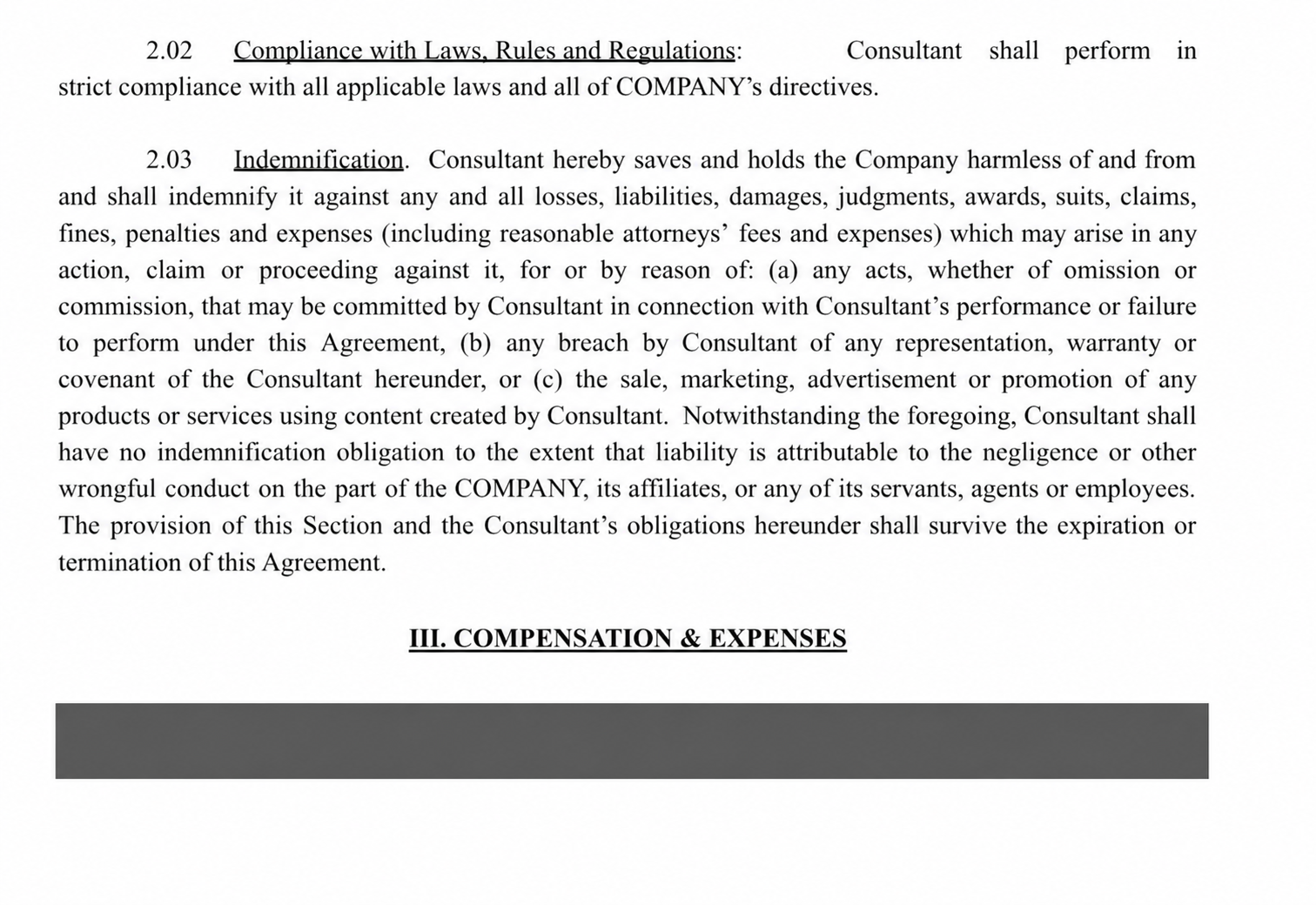
Client services agreement excerpt showing engagement terms and professional contractor scope
Workflow Overview

Service-agreement excerpt presented alongside the scope pages that describe the responsibilities.

A service-agreement excerpt presented alongside the scope pages that describe the responsibilities. Commercial terms are covered in the supplied image.

Client communication standardsAgreed service levelsContractual scope adherence
EXCERPT 08System Configuration Specialist

Snapshot and CRM operations

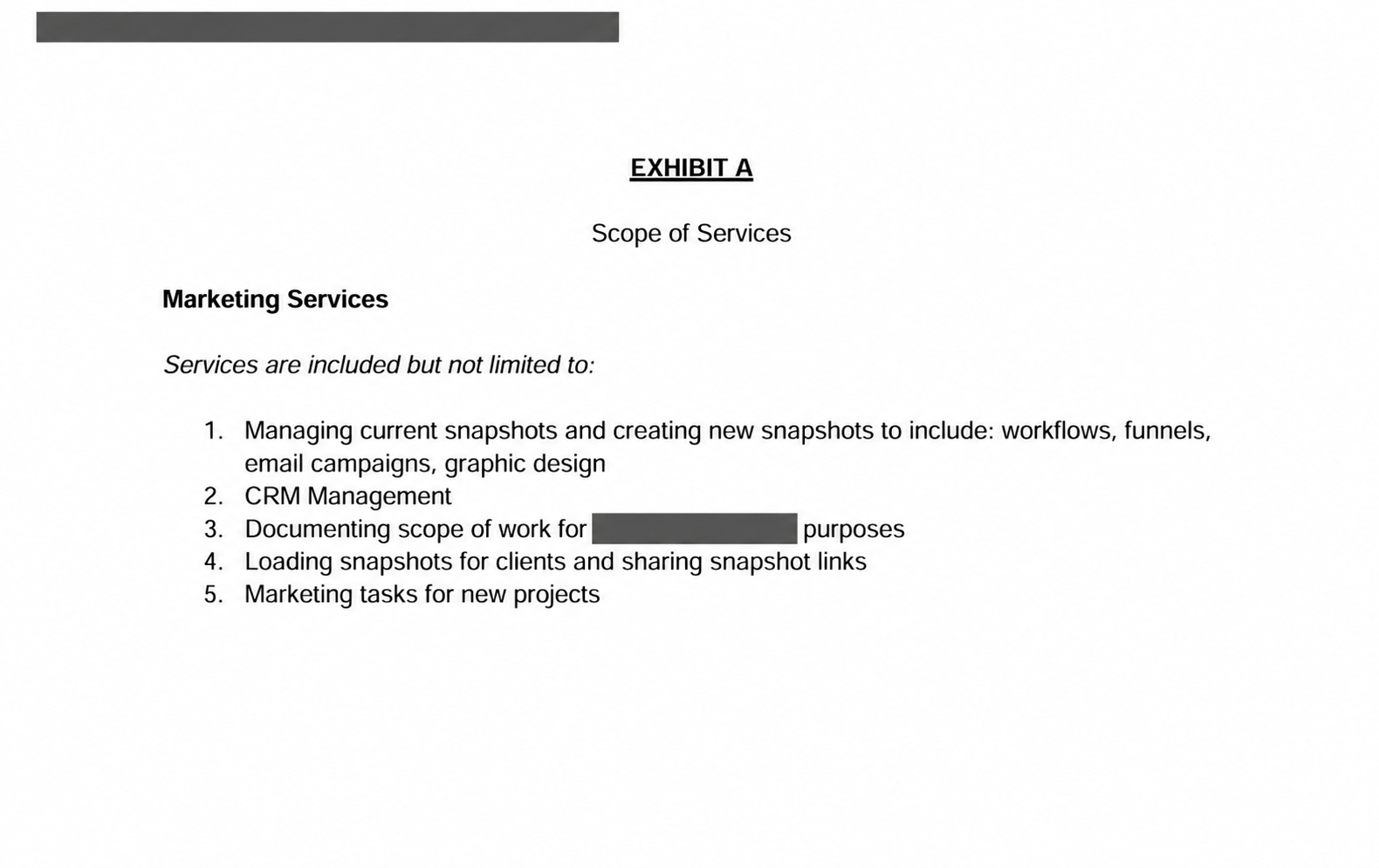
Scope document detailing snapshot management and creation, workflows, funnels, email campaigns, CRM management and client snapshot sharing
Workflow Overview

Contracted snapshot, CRM and rollout responsibilities.

The documented scope includes snapshot management and creation, workflows, funnels, email campaigns, CRM management, documentation and loading/sharing snapshots for clients.

Snapshot administrationCRM configurationDocumentationRepeatable client rollout
EXCERPT 09Technical Operations Specialist

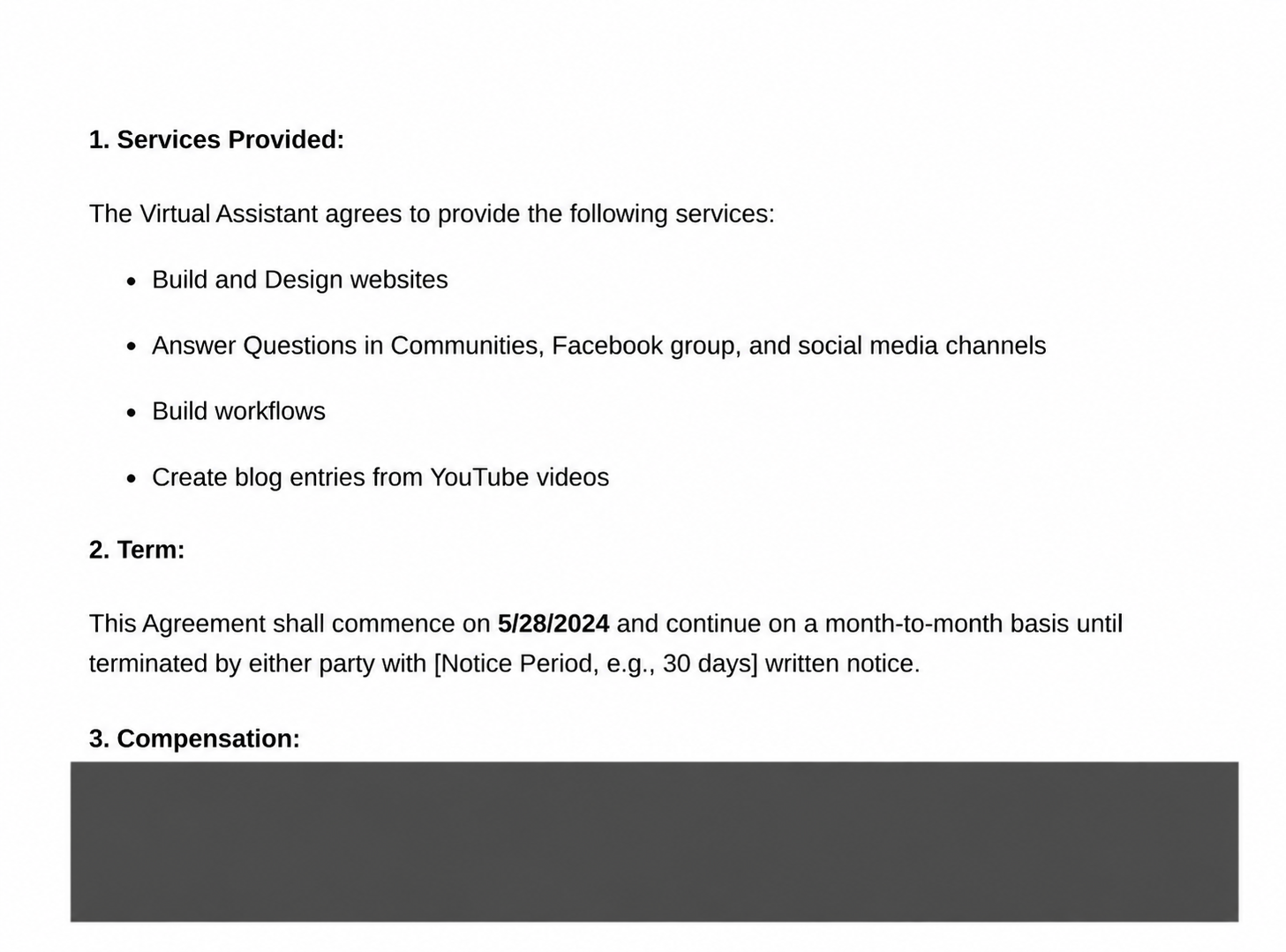
Website, workflow and community support

Scope excerpt detailing website builds, community question support, workflow builds and video-to-blog content repurposing
Workflow Overview

Website, workflow and community-support scope.

The services excerpt covers website builds, answering community questions, building workflows and repurposing video content into blog posts.

Website supportWorkflow buildingCommunity supportContent operations
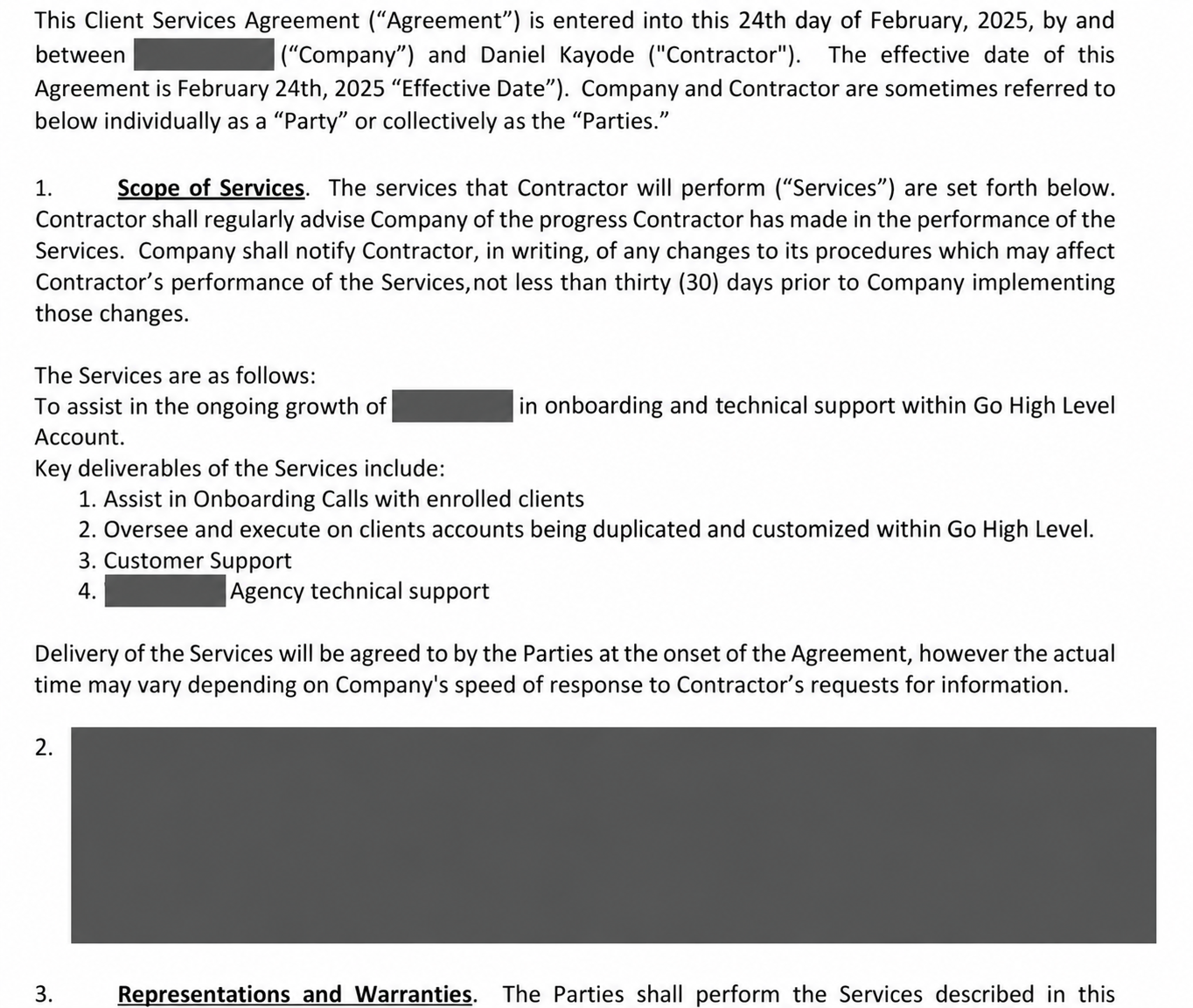
EXCERPT 10Agency Onboarding and Technical Support

Agency onboarding and SaaS support

Documented scope of services showing client onboarding calls, account duplication and customization, customer support, and agency technical support
Workflow Overview

GoHighLevel onboarding, account customization and technical-support responsibilities.

The scope covers client onboarding calls, account duplication and customization within GoHighLevel, customer support and agency technical support.

OnboardingAccount setupSub-account customizationCustomer supportAgency SaaS operations

Working together

Four steps, from understanding the process to a clear handover.

My working approach, whether onboarding an account, updating a booking journey or investigating a workflow issue.

  1. Understand the process

    Map how your team works today, whether onboarding an account, updating a booking journey or investigating a workflow issue.

  2. Configure the system

    Set up pipelines, calendars, forms and follow-up around that process, with sensible defaults and clear naming.

  3. Verify key behavior

    Test the booking links, automation and key paths where access permits, and note anything that needs escalation.

  4. Hand over clearly

    Walk the team through the setup with Loom walkthroughs and written notes so they can run it day to day.

Daniel Kayode portrait in black blazer

Daniel Kayode

GoHighLevel & SaaS Support Specialist

GoHighLevel & SaaS Support Specialist

About

A GoHighLevel and SaaS support specialist who treats the CRM as a tool for real people.

I build and support GoHighLevel systems for agencies and the businesses they serve. My work spans client onboarding, CRM configuration, automation and ongoing technical support.

I configure agency sub-accounts, customize snapshots, build funnels and forms, organize pipelines, and connect calendars, email and SMS workflows. My experience also covers contracts, estimates, invoicing and client handover.

Alongside implementation, I troubleshoot the issues that affect everyday operations: workflows that fail to trigger, booking conflicts, form redirects and account configuration problems. I provide clear guidance through onboarding calls, Slack support, Loom walkthroughs and practical documentation.

Working across multiple client accounts has taught me to understand the business process before configuring the system. I test the customer journey, document the setup and help clients feel confident using their CRM.

Whether you need a new GoHighLevel setup, improvements to an existing account or ongoing support for your agency's clients, I can help.


FAQ

Frequently Asked Questions

Common questions about working together on your GoHighLevel setup, agency sub-accounts and ongoing support.

Contact

Let's talk about your GoHighLevel setup.

Need help onboarding clients, configuring a CRM, improving a booking workflow or working through a technical issue? Tell me what you want your system to do and where you need support.

Or email directly at kayodekehindedaniel@gmail.com.

Focus

GoHighLevel setup, automation and support

Agency sub-account onboarding and white-label SaaS support.

Client training and day-to-day technical support.